Games · 11 tools ranked
Best PC Benchmarking Software in 2026
CapFrameX comes first in our ranking of PC benchmarking software, ahead of 3DMark and PresentMon. PC benchmarking software measures CPU, GPU, storage and frame times so you can compare hardware or find out why a game stutters.
The top three
How this list is ordered: by our editorial judgment of fit for the reader named above, based on vendor documentation, pricing and license pages opened on the review date. Vendors can pay for more visibility; how that works is explained in our disclosure, linked above every ranking. No commission is earned on clicks or purchases, and we do not work as an affiliate.
 CapFrameXCapFrameX records and plots frame times from real play, builds on PresentMon, and costs nothing to download.2
 3DMark3DMark from UL Solutions tests gaming performance on PCs, handhelds and phones, and compares results online for $34.99.3
 PresentMonPresentMon is Intel's open tool set that traces CPU, GPU and display frame durations across DirectX, OpenGL and Vulkan on Windows.
What is PC benchmarking software?
PC benchmarking software runs a repeatable workload, or records a real game session, and turns the result into numbers you can compare: scores for a CPU or graphics card, frame times for a running game, read and write speeds for a drive. Studios use it to set minimum specs; players use it to check an upgrade or chase a stutter.
How we ranked these
Benchmarking questions come in two shapes. One is a score question: is this graphics card faster than that one, and by how much.
The other is a behavior question: why does the game hitch every few seconds on this machine. Different programs answer each.
This ranking covers eleven tools, from synthetic suites to frame-time recorders and a disk tester, and puts the order from the viewpoint of someone who needs trustworthy numbers for a game or a build, such as a technical director setting recommended specs or a player validating hardware. We read vendor pages, download pages, license terms and repositories, and we did not run the benchmarks ourselves.
Where a vendor claims something, the text says so.
Scores versus frame times
A single score hides stutter. Synthetic suites such as 3DMark and Cinebench produce a number you can compare across machines, which is useful for hardware reviews and minimum-spec tables. Frame-time tools such as CapFrameX, PresentMon and NVIDIA FrameView record what happens inside a real game, including the slow frames that make play feel rough.
Studios need both: a score for the spec sheet and a capture for the bug report.
Repeatability and rules
A benchmark is only useful if two runs are comparable. Look for fixed workloads, stated driver rules and a place where results can be compared. 3DMark lists an online results comparison and a Hall of Fame; Unigine Superposition offers leaderboards; PCMark 10 describes approved drivers and benchmark rules.
Capture tools leave repeatability to you, so you must script the same route in the game each time.
License and commercial use
Free does not always mean free for business. Unigine lists commercial licenses at $19.95, $495 and $7500 on its page, and PCMark 10 has a Professional Edition licensed for commercial use. 3DMark sells at $34.99 for Windows or macOS.
Open tools such as PresentMon publish source with a license file. If results appear in a published review or a company report, read the terms before relying on a free download.
What it stresses and what it ignores
Each tool covers a slice of the machine. Cinebench exercises CPU and GPU through the Redshift render engine; CrystalDiskMark tests drives only; FurMark loads the graphics card hard with an OpenGL and Vulkan workload. None of them predicts a particular game perfectly.
Match the tool to the component you doubt, and confirm with a capture from the game itself before drawing conclusions.
Compared at a glance
| # | Product | Best for | Pricing | Free option | Based in |
|---|---|---|---|---|---|
| 1 | CapFrameX | Finding stutter in real game sessions | Free | Free | |
| 2 | 3DMark | Comparable gaming scores and spec tables | Free trial | ||
| 3 | PresentMon | Developers who want the raw capture engine | Unknown | ||
| 4 | Cinebench | Comparing CPU and GPU rendering speed | Unknown | ||
| 5 | NVIDIA FrameView | Measuring performance per watt on GPUs | Free | Free | |
| 6 | Unigine Superposition | Stability and cooling checks on graphics cards | Free | ||
| 7 | CrystalDiskMark | Checking SSD and hard drive speed | Free | Free | |
| 8 | FurMark | Heat and stability tests on graphics cards | Free | Free | |
| 9 | AIDA64 | One tool for diagnostics, sensors and stress | Free trial | ||
| 10 | PCMark 10 | Testing office and workday PC performance | Unknown | ||
| 11 | UserBenchmark | Quick look at component rankings | Free | Free |
The 11 tools, reviewed
About the order: it reflects our own reading of each vendor's documentation, prices and license terms, weighed for the reader this page is written for. Vendors can pay for more visibility; how that works is explained in our disclosure, linked above every ranking. No commission is earned on clicks or purchases, and we do not work as an affiliate.
-
1
CapFrameX
Free frame-time capture and analysis for Windows
Why #1: CapFrameX records and plots frame times from real play, builds on PresentMon, and costs nothing to download.
- Best for
- Finding stutter in real game sessions
- Pricing
- Free download. The download page offers an installer and a portable version as .zip files; the homepage also links a Donate page.
- Free option
- Free
- Company
- CapFrameX
- Platforms
- Windows (x64 installer and portable version; needs the .NET 10.0 Desktop Runtime installed)
- Key features
- Frametime capture, FPS and frametime analysis and plots, Sensor recording, Cloud sharing of results, RTSS overlay, Portable version
For anyone chasing a stutter instead of a score, CapFrameX is the most direct tool in this list. The vendor describes a frame-time capture and analysis tool based on Intel's PresentMon, with FPS and frame-time plots, sensor recording, cloud sharing of results and an overlay provided by RivaTuner Statistics Server.
A portable version exists beside the installer. Because the download is free and the interface does the analysis, a small studio can give every tester the same capture routine, which is why it leads.
Where it falls short
It runs on Windows only and requires the .NET 10.0 Desktop Runtime. The overlay depends on a separate program, RivaTuner Statistics Server.
Support runs through GitHub issues, forums and email rather than a paid desk.
Skip it if
People wanting a single comparable score for a spec sheet should use 3DMark; those who want a barebones open capture engine can take PresentMon.
Sources checked for CapFrameX
-
2
3DMark
Graphics benchmark suite with online result comparison
Why #2: 3DMark from UL Solutions tests gaming performance on PCs, handhelds and phones, and compares results online for $34.99.
- Best for
- Comparable gaming scores and spec tables
- Pricing
- For Windows $34.99; For macOS $34.99; For Windows and macOS $34.99, sold through UL Solutions, Steam and Epic Games; iOS and Android apps are free; the demo can be tried first.
- Free option
- Free trial
- Company
- UL Solutions
- Platforms
- Windows and macOS; iOS and Android apps
- Key features
- Gaming benchmarks, Ray tracing tests, Online results comparison, Hall of Fame, Mobile benchmarks, Demo
When you need a number that other people can reproduce, 3DMark is the usual reference. UL Solutions lists gaming benchmarks, ray tracing tests, online result comparison, a Hall of Fame and mobile benchmarks, plus a demo to try first.
It costs $34.99 for Windows, for macOS, or for both, sold through UL Solutions, Steam and Epic Games, and the iOS and Android apps are free. That clear price and the comparison database make it the best score tool here.
Where it falls short
A score does not reveal stutter inside a particular game. The pages we read do not describe Linux support, and the same $34.99 price is listed for each platform option.
Skip it if
Developers diagnosing hitching in their own build should use CapFrameX or PresentMon, and users wanting only CPU render times can use Cinebench.
Sources checked for 3DMark
-
3
PresentMon
Open capture tools for frame durations and latency
Why #3: PresentMon is Intel's open tool set that traces CPU, GPU and display frame durations across DirectX, OpenGL and Vulkan on Windows.
- Best for
- Developers who want the raw capture engine
- Pricing
- Pricing is not stated on the repository page. The source is published on GitHub with a LICENSE.txt file in the repository.
- Free option
- Unknown
- Company
- PresentMon
- Platforms
- Windows
- Key features
- CPU, GPU and display frame duration capture, Frame latency metrics, DirectX, OpenGL and Vulkan support, Desktop and UWP application support
PresentMon is the plumbing underneath several better-known tools, and it is useful in its own right for engineers who want to script captures. According to its README it traces CPU, GPU and display frame durations and frame latency for desktop and UWP applications across DirectX, OpenGL and Vulkan.
The source lives in the GameTechDev GitHub repository with a license file. A technical team can run it in automated test passes and feed the output into its own charts.
Where it falls short
It is aimed at developers: the pages we read describe capture tools, not a friendly results browser, and state no price. Support is through the repository.
Windows is the only platform listed.
Skip it if
Testers who want plots, sharing and an overlay out of the box should use CapFrameX, which builds on it.
Sources checked for PresentMon
-
4

Cinebench
Render-based CPU and GPU test from Maxon
Why #4: Cinebench 2026 uses the Redshift rendering engine to measure CPU and GPU performance, and Maxon offers it as a download.
- Best for
- Comparing CPU and GPU rendering speed
- Pricing
- Download offered on the vendor page; no price is stated on the opened page.
- Free option
- Unknown
- Company
- Maxon Computer GmbH
- Key features
- CPU benchmark, GPU benchmark, Redshift rendering engine, Cinebench 2026
Cinebench is a quick way to see how a processor behaves under a sustained rendering load. Maxon states that Cinebench 2026 uses the Redshift rendering engine to evaluate both CPU and GPU, and that it can be downloaded from its Cinebench page.
A studio buying workstations for artists can use it to compare candidate machines on a render workload. It earns fourth place because render speed matters for content creation more than for game frame pacing.
Where it falls short
The page shows no price or license text in our facts, no platform list was captured, and the workload is a render, not a game. A strong score says little about stutter.
Skip it if
Players tuning gameplay should use 3DMark or a capture tool like CapFrameX.
Sources checked for Cinebench
-
5
NVIDIA FrameView
Free NVIDIA app for frame rate, frame time and power
Why #5: FrameView is NVIDIA's free app that records FPS, frame times, GPU power and performance per watt.
- Best for
- Measuring performance per watt on GPUs
- Pricing
- Free. The vendor page describes it as the free FrameView app.
- Free option
- Free
- Company
- NVIDIA Corporation
- Key features
- Frames per second measurement, Frame time measurement, GPU power measurement, Performance per watt
FrameView adds a column most capture tools lack: power. NVIDIA describes it as an application for measuring frame rates, frame times, power and performance per watt on a range of GPUs, and it calls the app free.
That makes it handy when you compare two driver versions or two power limits and want to know efficiency, not just speed. It is published by NVIDIA Corporation, so the download page and documentation come straight from the vendor.
Where it falls short
The pages we read do not list supported operating systems, and the tool offers no cross-machine score database. Its focus on measurement leaves analysis plots to you or to other programs.
Skip it if
Users wanting a comparable score or richer plots should consider 3DMark or CapFrameX.
Sources checked for NVIDIA FrameView
-
6

Unigine Superposition
Free extreme-load graphics benchmark with leaderboards
Why #6: Superposition is a free Windows and Linux stress and performance test with a loop mode, VR mode and leaderboards.
- Best for
- Stability and cooling checks on graphics cards
- Pricing
- Free download; commercial licenses are listed at $19.95, $495 and $7500 (tax not included), with license types for VR users, hardware manufacturers and commercial companies.
- Free option
- Free
- Company
- UNIGINE
- Platforms
- Windows (1276 MB) and Linux (1564 MB) downloads
- Key features
- Stress test, Loop stress test, Leaderboards, VR mode with Oculus and SteamVR, Free exploration mode, Commercial use
Superposition suits builders who want to know whether a graphics card, power supply and cooling setup hold up under load. UNIGINE calls it an extreme performance and stability test, offers a free download for Windows (1276 MB) and Linux (1564 MB), and lists a loop stress test, leaderboards, a VR mode with Oculus and SteamVR, and a free exploration mode.
Linux support and the leaderboards give it character that rivals lack.
Where it falls short
Commercial use is licensed separately, with listed prices of $19.95, $495 and $7500 before tax. The download is large, and the benchmark is synthetic, so it will not mirror a specific game.
Skip it if
Teams needing in-game frame-time capture should use CapFrameX or FrameView instead.
Sources checked for Unigine Superposition
-
7
CrystalDiskMark
Simple free disk benchmark for Windows
Why #7: CrystalDiskMark is a freeware disk benchmark with Standard, Aoi and Shizuku editions, last listed at version 9.0.3.
- Best for
- Checking SSD and hard drive speed
- Pricing
- Freeware. The vendor's About page says all of its programs are freeware, with portions under the MIT license.
- Free option
- Free
- Company
- Crystal Dew World
- Platforms
- Windows XP to Windows 11, Windows Server 2003 to 2025; x86, x64 and ARM64
- Key features
- Disk benchmark, Standard, Aoi and Shizuku editions, Windows and Windows Server support
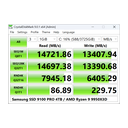
Storage is often the quiet cause of slow loads, and CrystalDiskMark tests it in a few clicks. The vendor describes a simple disk benchmark with Standard, Aoi and Shizuku editions, supporting Windows XP to 11 and Windows Server 2003 to 2025 across x86, x64 and ARM64.
Its publisher says all programs are freeware, with some portions under the MIT license, and the homepage lists version 9.0.3 from May 24, 2026. It is narrow but dependable.
Where it falls short
It measures drives only, so it says nothing about CPU, GPU or frame pacing. Windows is the only family listed.
Results depend on drive state, such as free space, so comparisons need care.
Skip it if
Anyone testing graphics or rendering should pick 3DMark, Cinebench or a frame-time tool.
Sources checked for CrystalDiskMark
-
8

FurMark
Free GPU stress test with OpenGL and Vulkan benchmark
Why #8: FurMark 2 loads a GPU very hard on Windows and Linux and doubles as an OpenGL and Vulkan benchmark with online scores.
- Best for
- Heat and stability tests on graphics cards
- Pricing
- Free. The vendor page says FurMark is simple to use and is free.
- Free option
- Free
- Company
- FurMark
- Platforms
- Windows and Linux (FurMark 2, 32-bit and 64-bit); FurMark 1 for Windows 32-bit
- Key features
- GPU stress test, OpenGL and Vulkan benchmark, Online scores, Command line support, Built with GeeXLab
FurMark answers one blunt question: does this card survive a worst-case load. Geeks3D describes FurMark 2 as a very intensive GPU stress test for Windows and Linux in 32-bit and 64-bit builds, with a quick OpenGL and Vulkan benchmark, online scores and command line support, and says it is free.
FurMark 1 for 32-bit Windows is still maintained. For a builder validating cooling it is simple to run and to script.
Where it falls short
A stress test pushes loads no game reaches, so temperatures and power can look worse than real use. It focuses on the GPU alone, and the pages we read give no results analysis beyond online scores.
Skip it if
Users testing everyday game behavior should use a capture tool like CapFrameX; those wanting a broad system report can use AIDA64.
Sources checked for FurMark
-
9

AIDA64
System information, monitoring and benchmarks for Windows
Why #9: AIDA64 from FinalWire combines hardware detection, sensor monitoring, stress and benchmark tests, sold as editions with a product key.
- Best for
- One tool for diagnostics, sensors and stress
- Pricing
- Pricing is not shown on the opened pages. AIDA64 is licensed with a product key; the licensing page describes support and maintenance periods, renewals, and trial versions. Editions are Extreme, Engineer, Business and Network Audit.
- Free option
- Free trial
- Company
- FinalWire Ltd
- Platforms
- Windows 64-bit, including Windows 11 and Windows Server 2025
- Key features
- Hardware detection, Software and Windows configuration pages, Real-time sensor monitoring, Stress and benchmark tests, Network audit (Network Audit edition), Overclocking support
AIDA64 is less a benchmark than a toolbox. FinalWire lists hardware detection, software and Windows configuration pages, real-time sensor monitoring, stress and benchmark tests and overclocking support, across Extreme, Engineer, Business and Network Audit editions.
The vendor says it has developed the product since 1995 and recently released version 8.40. IT teams that audit many machines get the most from it, because one program covers inventory and tests.
Where it falls short
No prices appear on the pages we read, only license terms with a product key and renewable maintenance periods. A trial exists, but a studio must ask which edition fits.
It is Windows only.
Skip it if
Players wanting a free frame-time recorder should use CapFrameX or FrameView.
Sources checked for AIDA64
-
10

PCMark 10
Office productivity benchmark from UL
Why #10: PCMark 10 benchmarks office PCs in Express and Professional editions, but UL is steering new buyers toward Procyon.
- Best for
- Testing office and workday PC performance
- Pricing
- Editions include PCMark 10 Express and Professional Edition; exact prices are not shown on the opened page. The vendor says it is encouraging new customers to choose Procyon.
- Free option
- Unknown
- Company
- PCMark 10
- Platforms
- Windows (page says it was updated for Windows 10)
- Key features
- Office productivity workloads, Express edition, Professional edition, Commercial use license, Approved drivers and benchmark rules
PCMark 10 measures everyday work, not games, so it covers the part of a studio's fleet that runs spreadsheets, calls and documents. UL describes it as a benchmark for the modern office PC, offered as an Express edition and a Professional Edition licensed for commercial use, with approved drivers and benchmark rules.
It ranks low on a gaming list because the workloads are not game-like, and the vendor itself encourages new customers to choose Procyon.
Where it falls short
Exact prices are not shown on the opened page. The page says it was updated for Windows 10, and the vendor's push toward a newer suite signals an aging product.
Skip it if
Game teams should skip it and use 3DMark or CapFrameX; office fleet buyers may look at Procyon from UL.
Sources checked for PCMark 10
-
11
UserBenchmark
Free speed test with a user-driven ranking database
Why #11: UserBenchmark runs a one-minute speed test and ranks CPUs, GPUs, SSDs, HDDs, RAM and USB devices from user data.
- Best for
- Quick look at component rankings
- Pricing
- Free. The homepage offers a free speed test and a free download.
- Free option
- Free
- Company
- UserBenchmark
- Platforms
- Web and a free Windows download
- Key features
- PC speed test, Component rankings for CPU, GPU, SSD, HDD, RAM and USB, FPS and EFPS estimates, Compare and build tools, SkillBench
UserBenchmark is convenient because anyone can run its free test in under a minute and see where a component lands. The site lists component rankings, FPS and EFPS estimates, Compare and Build tools and SkillBench, offers a free download, and says it has served users since 2011 and declines sponsorship.
It ranks last because crowd data with estimated FPS is a weak basis for a spec decision.
Where it falls short
Results come from a user-driven database rather than a controlled workload, so they vary with background software. The pages we read do not describe methods, and the FPS figures are estimates.
Skip it if
Studios setting minimum specs should use 3DMark, Cinebench or captured frame times from CapFrameX.
Sources checked for UserBenchmark
What this list shows
Of the eleven products here, six are plainly free to download: CapFrameX, NVIDIA FrameView, FurMark, CrystalDiskMark, UserBenchmark and the Unigine Superposition base download. Only 3DMark states a flat retail price ($34.99). Two have no price on the pages we read, Cinebench and PCMark 10, and AIDA64 sells editions with a product key without showing amounts.
Windows dominates: CapFrameX, PresentMon and PCMark 10 are Windows-only on their pages, while 3DMark adds macOS and mobile apps, and FurMark and Unigine add Linux.
The list reflects a real divide between measurement and marketing. Frame-time capture tools tell a developer where a game falls apart, but they say little about how a machine compares with others. Score suites give a comparison but can flatter a system that stutters.
UserBenchmark is a special case: it is a large crowd database with FPS estimates, which is convenient for a quick look but a weak basis for a formal spec decision. The best workflow pairs one score tool with one capture tool and notes the driver version beside every number.
How to choose
1. Name the question first
Decide whether you need a comparison or a diagnosis. For a purchase or a spec sheet, choose a synthetic suite with an online result list. For a stutter report, choose a frame-time recorder and play the game.
Writing the question in one line stops the common mistake of running a render benchmark to explain a streaming hitch in a shooter.
2. Match the tool to the component
Pick Cinebench for CPU and GPU rendering, CrystalDiskMark for the drive, FurMark or Unigine Superposition for graphics card stability, and CapFrameX, PresentMon or FrameView for in-game behavior. AIDA64 spans several components and adds monitoring. A small kit of three tools covers most cases and avoids a bloated install on a test machine.
3. Control the variables
Fix the driver version, power plan, background programs and game route before you compare anything. Run each test several times and keep the median. Record the tool version, for example CrystalDiskMark 9.0.3 or CapFrameX 1.9.1 as listed by the vendors today, because later releases can change scores.
Store results in a shared file so a teammate can repeat the run.
Frequently asked questions
What is the best PC benchmarking software in 2026?
CapFrameX is our first pick for game developers and players who care about stutter, because it is a free frame-time capture and analysis tool built on PresentMon with plots and sensor recording. 3DMark is better when you need a comparable score and an online results list for $34.99, and PresentMon is better when you want the bare open capture engine.
What is the difference between a benchmark score and a frame-time capture?
A score summarizes performance from a fixed test, so you can compare machines. A frame-time capture records how long each frame took during real play, so it exposes stutter that an average frames-per-second figure hides. CapFrameX, PresentMon and NVIDIA FrameView do the second; 3DMark and Cinebench do the first.
Is PresentMon the same as CapFrameX?
No, but they are related. PresentMon is Intel's open set of tools that capture CPU, GPU and display frame durations and latencies across DirectX, OpenGL and Vulkan. CapFrameX is based on PresentMon and adds an analysis interface, plots, sensor recording and cloud sharing of results, with an overlay from RivaTuner Statistics Server.
Is UserBenchmark reliable for choosing hardware?
Treat it as a quick reference only. The site offers a free speed test, component rankings and FPS estimates, and says it declines sponsorship. Its numbers come from a user-driven database rather than a controlled workload, so they are less suited to a studio spec decision than 3DMark or a captured game session.
Which benchmarks are free for commercial use?
Check each license. Unigine Superposition is a free download but lists separate commercial licenses at $19.95, $495 and $7500. PCMark 10's Professional Edition is the commercial one.
CrystalDiskMark's publisher says all its programs are freeware. When in doubt, read the vendor license page before publishing results.
Can I benchmark a laptop or handheld?
Yes, within limits. 3DMark is offered by UL Solutions for PCs, handhelds, tablets and phones, with iOS and Android apps that are free. Frame-time tools such as PresentMon and CapFrameX run on Windows machines, so a Windows handheld works, while Superposition and FurMark also list Linux builds.
Do I need a separate disk benchmark?
If load times or asset streaming matter, yes. CrystalDiskMark is a simple free disk benchmark for Windows, with Standard, Aoi and Shizuku editions, and its homepage lists version 9.0.3 from May 24, 2026. GPU and CPU suites do not measure storage in a comparable way.
Talk it through
Rankings are a starting point. The discussion thread for this ranking is open to anyone with a GA Forum account.